

Using awk and Friends with Hadoop

Join the DZone community and get the full member experience.
Join For Freeimagine you have a csv file that you want to manipulate. here’s a sample file we can play with:
lopez,charlie,2002,11,21
parker,ward,1995,04,08
henderson,russell,2007,10,01
our goal is to transform this into the following form by combining the last three columns:
lopez,charlie,20021121
parker,ward,19950408
henderson,russell,20071001
in linux this would take all of two seconds (excuse the awkward awk command):
shell$ awk -f"," '{ print $1","$2","$3$4$5 }' people.txt
what if you wanted to quickly do the same in hdfs - and let’s assume you
want to write the results back to hdfs. one approach would be to use
the hdfs cli to stream the inputs into awk, and stream the awk output
back into hdfs. you could do this with the hdfs
cat
and
put -
options (note that adding a hyphen after
put
instructs the put command to stream data from standard input to hdfs):
shell$ hadoop fs -cat people.txt | awk -f"," '{ print $1","$2","$3$4$5 }' | hadoop fs -put - people-coalesed.txt
btw, if your input and output files are lzop-compressed then this command would work:
shell$ hadoop fs -cat people.txt.lzo | lzop -dc | awk -f"," '{ print $1","$2","$3$4$5 }' | \
         lzop -c | hadoop fs -put - people-coalesed.txt.lzo
this is great if your file isn’t too large, but if it’s multiple gigabytes in length then you probably want to harness the power of mapreduce to get this done in a jiffy! the words “in a jiffy” and “mapreduce” aren’t commonly used together, so what do we do? well you could crack open pig or hive and write some custom user-defined functions, but this means you end up in java which we want to avoid.
hadoop streaming comes to the rescue in these situations. let’s first create our awk script which will be executed:
shell$ cat people.awk
#!/bin/awk -f

begin { fs = "," }
{ print $1","$2","$3$4$5 }
in linux, if you make this awk script executable, you could execute is as follows:
shell$ ./people.awk people.txt
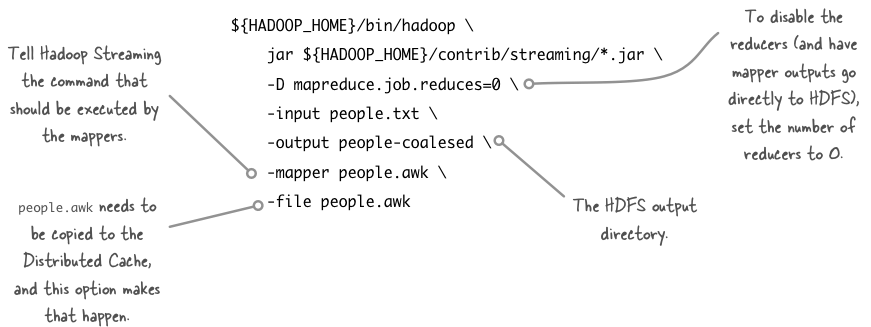
in mapreduce-land we don’t need to join data in this particular example, so we don’t need to run any reducers. call your awk script from mappers via hadoop streaming with this command:
shell$ hadoop_home=/usr/lib/hadoop
shell$ ${hadoop_home}/bin/hadoop \
  jar ${hadoop_home}/contrib/streaming/*.jar \
  -d mapreduce.job.reduces=0 \
  -d mapred.reduce.tasks=0 \
  -input people.txt \
  -output people-coalesed \
  -mapper people.awk \
  -file people.awk
a few options in the hadoop streaming command are worth examining:
finally - to get lzo into the picture you need to add
-inputformat
,
-d mapred.output.compress
and
-d mapred.output.compression.codec
arguments:
shell$ hadoop_home=/usr/lib/hadoop
shell$ ${hadoop_home}/bin/hadoop \
  jar ${hadoop_home}/contrib/streaming/*.jar \
  -d mapreduce.job.reduces=0 \
  -d mapred.reduce.tasks=0 \
  -d mapred.output.compress=true \
  -d stream.map.input.ignorekey=true \
  -d mapred.output.compression.codec=com.hadoop.compression.lzo.lzopcodec \
  -inputformat com.hadoop.mapred.deprecatedlzotextinputformat \
  -input people.txt.lzo \
  -output people-coalesed \
  -mapper people.awk \
  -file people.awk
Published at DZone with permission of Alex Holmes, DZone MVB. See the original article here.
Opinions expressed by DZone contributors are their own.
Comments